

Workers with a real workspace
Each node has its own instructions, skills, memory and tools. It is a working environment, not a prompt in a browser tab.
 Hive — an AI workforce that runs on your machines.
Hive gives your company a team of AI workers. Each worker lives on infrastructure you control, works inside your channels and tools, remembers context, follows skills you write, and can be scheduled like a colleague.
What Hive is
Most AI tools answer a question and forget it. Hive runs workers with a workspace, a job description, tools, memory and a schedule — then shows you what they are doing.
Each node has its own instructions, skills, memory and tools. It is a working environment, not a prompt in a browser tab.
Workers run on a local machine, a Docker host or the desktop assistant. Company data, workspaces and model keys stay scoped to your company.
Review gates, roles, permissions and a live floor make the workforce observable. Your team decides where judgement matters.
See it working
Click the rail or let the tour run. This is the same flow your team uses every day: watch the floor, open the inbox, talk to a worker and review the automations behind it. Demo data only.
01 · Live floor
1 / 4The floor shows every worker, its state and what it is handling. Click a worker to open its chat and history.
Illustrative demo data. No customer conversations are shown.
The platform
See who is online, what they are working on, what came in, and what needs a human. Switch between the four surfaces below.
Every node appears on the floor with its status. Click a worker to open its chat, history, settings and current work. You can see the inbox, company room and per-worker activity without digging through logs.
Connect WhatsApp, Telegram, email or the dashboard inbox. Hive routes each conversation to the right worker, keeps the thread history, and applies your office hours and rate limits before a message wakes an agent.
Write the system prompt, manage the workspace router, install skills from templates and sync changes back to the node. Choose the model and provider keys per company or per worker.
Manage companies, roles and tab visibility. Track usage and token cost, restart nodes, review channel activity and move a worker between companies without losing its workspace.
Channels
One worker can answer on WhatsApp, Telegram, email and the dashboard. Replies stay in the same thread, with the same memory and the same rules.
Capabilities
Skills, schedules, memory, meetings and governance are part of the platform — not a pile of separate tools you have to wire together.
Write reusable instructions once, install curated templates and assign them to the workers that need them. Nodes sync their local skills back to the company.
Wake a worker on a cron schedule for a morning briefing, a weekly report or a follow-up sweep. Runs even when nobody is in the chat.
Daily, weekly and monthly summaries are kept in the node's workspace. Workers recall past decisions and compact old notes instead of starting cold.
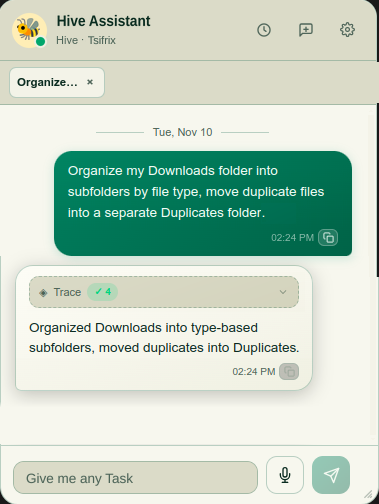
The desktop assistant handles voice input and spoken replies. Meeting listen can transcribe tab audio plus your microphone, then summarise the call.
Every channel conversation lands in one inbox with its thread history. Search, switch channels and pick up where the worker left off.
Company-scoped users and data, encrypted provider keys, role-based tab visibility, rate limits and the ability to block an identity and purge its history.
Use company provider keys, per-worker overrides or local models such as Ollama. Pick the model per job instead of forcing one vendor everywhere.
Install capabilities from a manifest. Plugins can bring their own skills, and the ones they own are removed cleanly when you uninstall them.
Design the workflow so workers propose and humans approve. Escalations, exceptions and approvals stay visible instead of disappearing into automation.
How it works
A worker can be online the same day. Start with one job, one channel and a clear review point, then expand.
Create the company, invite the admin and add the provider keys the workforce will use.
Run the node on a local machine, spawn a Docker container or start the desktop assistant.
Add instructions, skills and a schedule. Connect the channels it should answer and the people it can hand off to.
Watch the live office, review conversations, correct the brief and let the worker take the next shift.
Deploy
Hive keeps the control plane in one place while the workers run close to your tools and data. Pick the deployment path that fits the machine.
Any machine
One command runs a worker on a machine with Node.js. Good for a laptop, an office PC or a small server.
Gateway host
Let the gateway spawn an isolated container when Docker is available. A clean worker without touching the host setup.
Desktop
A floating assistant bubble for macOS and Linux. Voice input, spoken replies and meeting transcription sit on top of the same worker.
Control & data
Giving an AI worker access to conversations and internal tools is a trust decision. Hive is designed so you can answer who has access, what the worker can do and where the data lives.
Who it is for
Hive is delivered as a Tsifrix engagement: setup, skills, channels and the first workflow are scoped with your team.
Hive questions
Short answers. The detailed version is a call with the people who build and run it.
Bring one workflow, one channel and the decisions a person still needs to make. We will show you what a Hive worker would do, where a human approves and what it takes to pilot.
Bring us one workflow. We will map it on a free call.
Book a free call